Le concept de la preuve
Building a minimal comic blog with Astro that stays almost entirely static — except for one serverless endpoint that handles votes
| TYPE | Web, Comics |
| DATE | |
| STACK | Astro, Tailwind CSS, Astro DB, Turso, Netlify, Sharp |

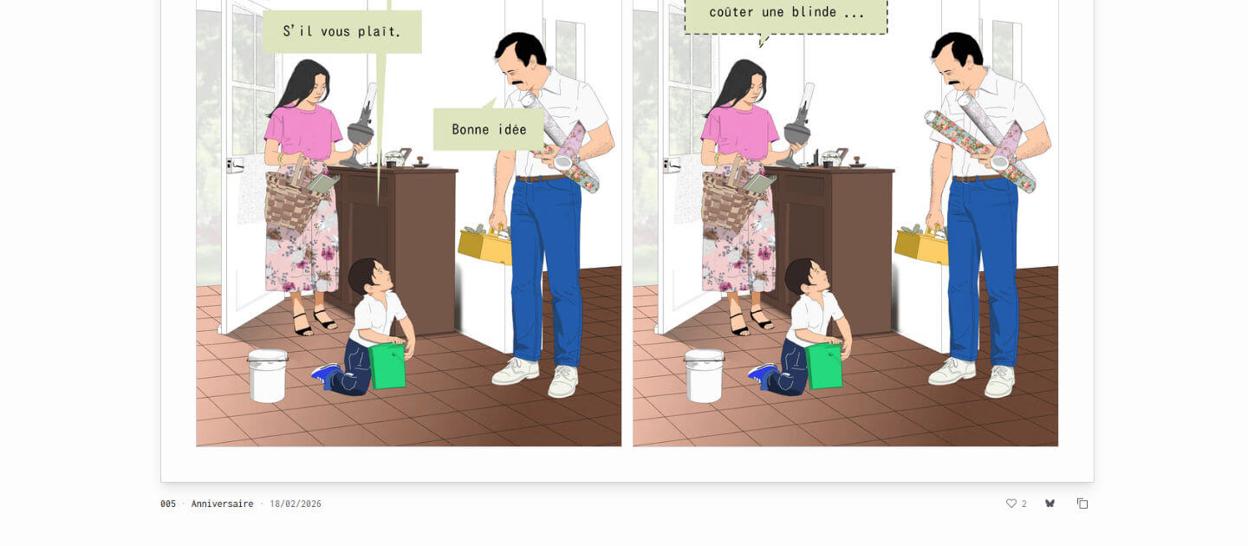
I’ve wanted to make humorous strips for a long time — something outside work where I could be freely ironic and dark. A couple and their kid navigate the absurdity of everyday life.
I didn’t want to feed Instagram’s data machine, so I built my own site and share on Bluesky. The system had one constraint: publishing must be dead simple — draw the vector illustrations, run one command, done. That little constraint is what makes me actually create more regularly.
A visual language for deadpan humor
The visual style matches the tone: thin black strokes, flat vector shapes, and a muted, naturalistic palette. No screaming colors, no manga speed lines, no exaggerated expressions. The characters look like they could be in an architecture rendering — composed images make the punchline land harder.
The site follows the same language. Inconsolata gives a steady, almost clinical rhythm. Each comic sits inside a thin-bordered card with generous padding, like a sheet of paper pinned to a wall. The illustrations provide the visual weight; the interface stays out of the way.
The challenge
Serve vector illustrations fast in modern formats without quality loss or unnecessary downloads; add a voting system while keeping pages prerendered (retaining CDN speed and low cost); and make publishing a single-command workflow with no manual image resizing or frontmatter boilerplate.
Static shell, one dynamic island
Every page is prerendered at build time — pure HTML on the CDN. The only server-rendered part is a single API endpoint: /api/vote.

Astro calls this the “islands” architecture — here it’s literally one island: the vote UI. The vote button renders in static HTML in a disabled state, then hydrates client-side. Netlify Functions have cold starts, though: if a user clicks and waits 800ms for the function to wake, it feels broken.
A minimal fix is an early prefetch. The Layout injects an inline script into <head> — before any module script loads — that starts the API call during HTML parse:
// Layout.astro — in <head>, before DOMContentLoaded
window.__votePromise = fetch("/api/vote?comic=" + earlyVoteParam);
Vote scripts check window.__votePromise first and fall back to their own fetch if it’s missing. The server batch-queries all comic IDs in one request and runs two parallel DB queries — total counts and whether this visitor already voted — so it’s always two queries, not 2×N:
// /api/vote.ts — GET handler
const [comicsCounts, userVotes] = await Promise.all([
  // Query 1
  db
    .select({ comicId: Vote.comicId, value: count() })
    .from(Vote)
    .where(inArray(Vote.comicId, comicIds))
    .groupBy(Vote.comicId),

  // Query 2
  db
    .select({ comicId: Vote.comicId })
    .from(Vote)
    .where(and(inArray(Vote.comicId, comicIds), eq(Vote.visitorId, visitorId))),
]);
The UI uses optimistic updates: the heart fills immediately on click, a pending Set prevents double-clicks, state is exposed with aria-pressed, and the icon swap (outline ↔ filled heart) is pure CSS.
Pixel-accurate image sizing
Vector art exported to PNG looks crisp — until the browser picks the wrong resolution. Initially the <picture> had no sizes attribute, so browsers assumed 100vw and fetched needlessly large images. On retina displays, fractional pixel widths caused sub-pixel antialiasing blur.
The pragmatic workaround: compute exact pixel widths from a shared layoutTokens.ts file and feed the same numbers to CSS and the image pipeline. sizes must use concrete pixel math (not CSS var()), so we compute breakpoints at build time.
// layoutTokens.ts
export const layoutTokens = {
  remBase: 16,
  // twoCol = (pageMax - 2*pagePad - 2*cardPadDesktop
  //           - 2*cardBorderPx - comicGap) / 2
  pageMaxRem: 81,
  pagePadRem: 1,
  comicGapRem: 1,
  cardPadDesktopRem: 3,
  cardBorderPx: 1,
};
ComicImage.astro derives exact widths and a sizes string using pixel values (not var()), then Astro generates avif and webp variants at those widths. No over-fetching, no blur.
One-command publishing
Publishing is pnpm new 006 — one command that does everything:
$ pnpm new 006

Title: Anniversaire
Alt text completion: Dessin d'un homme, une femme et un enfant
  dans l'entrée d'une maison.
  Une bulle de texte indique : '▌

✓ Copied page images to src/assets/comics/006/
✓ Created src/content/comics/006.md
✓ Generated cover (1200×630 OG image)
✓ Optimized all PNGs (saved 42%)
The script reads exported PNGs, prompts for title and alt text (prefilled template for recurring characters), writes the Markdown with frontmatter, generates the OG cover via Sharp compositing (SVG text + thumbnails), and compresses images. One command — zero manual steps.
Reading rhythm — design decisions and tradeoffs
How the feed reads matters. The index is a single vertical feed (newest first) with no pagination. Dumping everything at full opacity becomes a wall — five strips stacked at full opacity are a visual block, not a reading experience.
Current approach: all comics except the first start at 10% opacity. An IntersectionObserver fades each card to full opacity once ~45% is visible, then unobserves it:
const observer = new IntersectionObserver(
  (entries) => {
    for (const entry of entries) {
      if (entry.isIntersecting) {
        entry.target.classList.remove("opacity-10");
        entry.target.classList.add("opacity-100");
        observer.unobserve(entry.target);
      }
    }
  },
  { threshold: 0.45 },
);
Between comics, a small down-arrow (ScrollHelper) anchors to the next strip’s id; tapping it smooth-scrolls the reader to the next card (scroll-behavior: smooth) — a gentle nudge, not a hard pagination.
Each <picture> also reveals itself: if img.complete the image appears instantly; otherwise a 400ms blur-to-sharp animation plays on load. No layout shifts, no blank rectangles, no jarring pop-in.
This solution works well for dozens of comics, but if the feed grows much larger we can consider pacing strategies (CSS scroll-snap, a lightweight slider, or soft pagination) — tradeoffs between discoverability and focused reading.
Shaving bytes everywhere
A comic site is mostly images; everything else should be negligible.
Images. Vector exports are PNGs. Sharp removes alpha (the art has no transparency), flattens to white, and re-compresses at aggressive lossless settings. At build time, Astro’s <Picture> generates avif/webp at the exact widths from layout tokens. The top comic uses fetchpriority="high" and loading="eager", others lazy-load.
// optimize-images.js — max lossless compression
pipeline = sharp(imagePath)
  .removeAlpha()
  .flatten({ background: "#ffffff" })
  .png({ compressionLevel: 9, effort: 10 });
Fonts. Inconsolata loads with a non-blocking pattern: <link rel="preload" as="style"> then media="print" onload="this.media='all'". The page renders immediately with the system monospace stack, swapping to Inconsolata on arrival — no Flash Of Invisible Text (FOIT), minimal Flash Of Unstyled Text (FOUT).
Styles. build.inlineStylesheets: 'always' in Astro inlines CSS into the HTML so there’s one fewer network request.
Scripts. Analytics (Umami) loads via requestIdleCallback. The vote prefetch runs only when earlyVoteIds are present. Client code is vanilla TypeScript — no extra runtime.
The result: CDN response time dominates static pages; the only variable latency is the vote API cold start, and the early-prefetch pattern effectively masks most of that.
What I learned
- Astro DB’s local/remote split is delightful. SQLite in dev, Turso in production; same ORM and queries with a
--remoteflag swap. - Cookie attributes matter
- Early prefetching masks serverless cold starts. Starting the API call during HTML parse buys 200–500ms the user doesn’t notice.
- The
sizesattribute matters. Without pixel-accurate breakpoints, you can easily fetch images twice as large as needed; furthermore, if the rendered size deviates from the actual image dimensions, any text within the illustrations becomes blurry due to sub-pixel antialiasing. Computing exact breakpoints from the same layout constants that drive the CSS fixed this, ensuring a perfect pixel match that keeps both the art and the dialogue crisp.